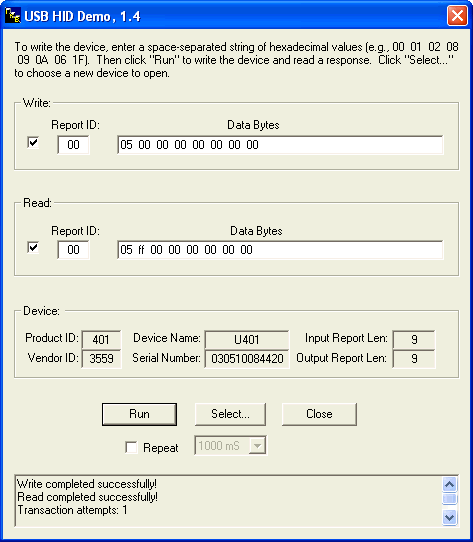
To run the Visual Basic generic demo, first open the following folder:
Start -> All Programs -> USB HID DEMO -> VB6
- U4x1 Demonstration
To run the Visual C++ U4x1 demo, perform the following Windows command:
Start -> All Programs -> USB U4x1 DEMO -> Usb
U4x1 Demo
The U4x1 demo is provided only for Visual C++ and was developed
primarily for showing how to access a UsbMicro U4x1 device. When
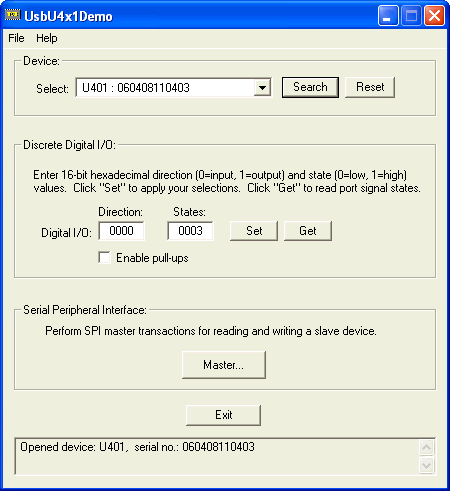
executed, the following dialog screen image will appear on your monitor
display:
Screenshot from U4x1 demo app - UsbU4x1Demo
The Visual C++ U4x1 demo project source code is located on
your PC as
follows:
Start -> All Programs -> USB U4x1 DEMO -> VC++
(There is no available Visual Basic version of this project.)
A trial version of the UsbHidApi is available for free
download.
The trial version is unregistered software that is fully operational,
but
displays periodic pop-up messages. Visit the Kadtronix website
for
download details.
- Installation
Before installing the UsbHidApi, you may need to uninstall any earlier
version. To start the installation process, locate and run the
self-extracting
setup file (setup.exe) on the install media.
Your device hardware may be plugged into any available USB
port using
a compatible cable. Since drivers pre-exist under Windows, you
may
plug in the device at any time, before or after installing the
UsbHidApi.
- Linking
Your application may link the UsbHidApi DLL
statically
(.lib) or dynamically (.dll). Dynamic linking differs from static
linking in that it allows your application module to include only
the information needed at run time to locate the executable code for a
DLL function. In static linking, the linker gets all of the
referenced
functions from the static link library and places it with your code
into
your executable. Using dynamic linking instead of static linking
offers several advantages. DLLs save memory, reduce swapping,
save
disk space, upgrade easier, provide after-market support, provide a
mechanism
to extend the MFC library classes, support multilanguage programs, and
ease the creation of international versions.
The Generic demo uses static linking
while the
U4x1demo uses dynamic linking. You may reference the appropriate
demo for further details.
- Header Definition
The header definition file defines the UsbHidApi library class and
lists all properties and features of the library including structure
assignments,
exported functions, and parameters. This file, listed below, may
be included in your application for static linking:
UsbHidApi.h
(This file is included in the distribution within the "VC++"
sub-folder.)
- Compiler Compatibility
TheUsbHidApi library is compatible with Visual C++ 2008, Visual C++
6.0, and Visual Basic 6.0 compilers. To meet the needs of
developers
who use other compilers, the API has been adapted for .NET (2003) and
ANSI C use.
For .NET, use the header file named: UsbHidApi_NET.h.
(Refer
to the "NET" folder of your installation for details.)
In addition, functions have been exported for compatibility with
certain
ANSI C compilers such as LabView and LabWindows/CVI. For
these situations, a special header file has been created named UsbHidApi_2.h
and is located in the "ANSI C" folder. This is a specially
modified
version of the original header (UsbHidApi.h) and is intended only for
use
with ANSI C applications. To use, copy the file to your project
space
and add the following statement to your C source file:
#include "UsbHidApi_2.h"
This statement serves to include or
add the file to your application. Also add the following library
file to your list of build objects
(located in the "VC++" folder):
UsbHidApi.lib
For additional information, see the
following online resources:
FAQ:
Using Dynamic Link Libraries with LabWindows/CVI
Integrating
external code using Import Shared Lib. Wizard
Writing
win32 DLLs and Calling them from LabView
(Note: Kadtronix can only provide limited
support for LabView and LabWindows applications. Demo applications for
LabView or LabWindows/CVI are not available.)
- Device Descriptors
If you are designing USB firmware, then one of your key considerations
will be definition of descriptors for the device. This is
important
for proper device enumeration by the host. There are several
types
of descriptors including configuration, device, and report.
Developers
will sometimes define a valid set of descriptors, but then fail to
properly
classify the device. The device is classified by its "usage" such as a
keyboard, joystick, or mouse. These devices are typically
allocated
for exclusive use by the operating system. If you are developing
a custom device (e.g., temperature controller, digital input/output
board,
etc.) using the HID class, then your report descriptor should indicate
a "Vendor Defined" usage as indicated in the sample report descriptor
below
(courtesy of L. Zadra):
/*------ Report Descriptor Group ---------------------*/
/* This is a basic report descriptor. All data in the */
/* reports are vendor defined and therefore the host */
/* doesn't care what we
transfer
*/
BYTE code abromReportDescriptor[SIZEOF_REPORT_DESCRIPTOR] =
{
0x06, 0xA0, 0xFF, // Usage Page (FFA0H = vendor defined)
0x09, 0x01, // Usage (vendor defined)
0xA1, 0x01, // Start Collection (Application)
// INPUT DEFINITION
0x09, 0x01, // Usage (vendor defined)
0x15, 0x00, // Logical Minimum (0)
0x25, 0xff, // Logical Maximum (255)
0x75, 0x08, // Report Size ( 8 BITS)
0x95, EP1_MAX_REPORT_SIZE, // Report Count (16 Bytes)
0x81, 0x00, // Input (Data, Variable, Absolute)
// OUTPUT DEFINITION
0x09, 0x02, // Usage (vendor defined)
0x75, 0x08, // Report Size (8 BITS)
0x95, EP0_MAX_REPORT_SIZE, // Report Count (16 Bytes)
0x91, 0x00, // 0utput (Data, Variable, Absolute)
0xC0 // End Collection
};
For more information, please refer to the following resource:
http://www.usb.org/developers/hidpage
- Function Reference
This section presents a description of functions provided by the
UsbHidApi
library. The library is encapsulated with a class called CUsbHidApi
for C++ users. To allow for the greatest flexibility and
compatibility,
individual functions have been exported for use with Visual Basic and
other
languages.
The library defines a device structure called mdeviceList.
Used primarily by the GetList( ) function, this structure defines an
entry
in a device list. The mdeviceList structure definition is
listed below.
typedef struct
{
char
DeviceName[50];
// Device name
char Manufacturer[50];
// Manufacturer
char SerialNumber[20];
// Serial number
unsigned int VendorID;
// Vendor ID
unsigned int ProductID; //
Product
ID
int
InputReportLen;
// Size of input report
int
OutputReportLen;
// Size of output report
int
Interface;
// Interface
int
Collection;
// Collection
} mdeviceList;
The UsbHidApi library provides a number of functions for use by
your application. Examples of their use can be found in the demonstrations.
- GetList( )
This function searches the system for attached USB HID devices and
builds a list of these devices and their availability. The caller
must supply a pointer to a buffer that will hold the list of structure
entries. Must also supply an integer representing maximum no. of
entries the buffer can hold. Returns total number stored.
int
CUsbHidApi::GetList(
unsigned
int VendorID,
unsigned
int ProductID,
char
*Manufacturer,
char
*SerialNum,
char
*DeviceName,
mdeviceList
*pList,
int
nMaxDevices);
Parameter descriptions:
VendorID
// Vendor ID to search (0xffff if unused)
ProductID
// Product ID to search (0xffff if unused)
Manufacturer
//
Manufacturer
(NULL if unused)
SerialNum
// Serial number to search (NULL if unused)
DeviceName
// Device name to search (NULL if unused)
pList
// Caller's array for storing device(s)
nMaxDevices
// Size of the caller's array list (no.entries)
- Open( )
This function opens a link to a specified USB HID device. The
caller supplies parameters describing the device, typically a vendor ID
and product ID. Additional optional parameters can be provided to
further describe the device if desired. (See also SetInterface
and SetCollection.) If a
successful
open occurs, the function returns TRUE. Otherwise, the function
returns
FALSE. If the bAsync flag is TRUE, subsequent read requests will
be non-blocking. A device must be opened before any other actions
can be taken on it.
int
CUsbHidApi::Open(
unsigned
int VendorID,
unsigned
int ProductID,
char
*Manufacturer,
char
*SerialNum,
char
*DeviceName,
int
bAsync)
Parameter descriptions:
VendorID
// Vendor ID to search (0xffff if unused)
ProductID
// Product ID to search (0xffff if unused)
Manufacturer
//
Manufacturer
(NULL if unused)
SerialNum
// Serial number to search (NULL if unused)
DeviceName
// Device name to search (NULL if unused)
bAsync
// Set TRUE for non-blocking read requests.
- Read( )
This function reads an input report from an open device. (The
device must be open prior to calling this routine.) The type of
read
performed is based on the method used for opening the device (blocking
or non-blocking). If no data is currently available, the function
returns 0. On successful completion, the function returns an
integer
representing the number of bytes read (usually the input report length
defined by the device). The function returns -1 if disconnect is
detected. (Note: The caller must supply a pointer to a read
buffer that is large enough to accommodate the report length.
This
number can be obtained using GetReportLengths.)
int
CUsbHidApi::Read(void
*Buf)
Parameter description:
Buf
// Pointer to the caller's storage buffer
- Write( )
This function writes an output report to an open device. (The
device must be open prior to calling this routine.) The function
writes the caller's data to the device. The number of bytes is
determined
by the output report length (refer to GetReportLengths).
The caller must guarantee the correct byte-count and buffer
storage.
(Note: The first byte location is usually a report ID [possibly
0].
The caller must ensure this value is prepended to the buffer.)
int
CUsbHidApi::Write(void
*Buf)
Parameter description:
Buf
// Pointer to the caller's storage buffer
- GetReportLengths( )
This function retrieves the lengths of input- and output-reports for
an open device. (The device must be open prior to calling this
routine.)
The caller must supply integer pointers for storing the report lengths.
void
CUsbHidApi::GetReportLengths
(
int
*input_len,
int
*output_len)
Parameter descriptions:
input_len
// Pointer for storing input report length
output_len
// Pointer for storing output report length
- SetInterface( )
This function sets an optional device interface ID (e.g., 0) for search
purposes and is used in instances only where the device has multiple
interfaces.
If used, must be called prior to calling the Open() function.
void
CUsbHidApi::SetInterface
(int iface)
Parameter description:
iface
// Interface (-1 if unused)
- GetInterface( )
This function eturns the interface ID that was set using
SetInterface().
int
CUsbHidApi::GetInterface
(void)
- SetCollection( )
This function sets an optional collection ID (e.g., 0) for search
purposes.
It is used to locate a device to be opened. Use this function
when
a the device has multiple collections. Must be called prior
to calling the Open() method.
void
CUsbHidApi::SetCollection
(int col)
Parameter description:
col
// Collection (-1 if unused)
- GetCollection( )
This function returns the optional collection ID that was set using
SetCollection().
int
CUsbHidApi::GetCollection
(void)
- CloseRead( )
This function closes the read pipe. (The device must be open
prior to calling this routine.)
void
CUsbHidApi::CloseRead(void)
- CloseWrite( )
This function closes the write pipe. (The device must be open
prior to calling this routine.)
void
CUsbHidApi::CloseWrite(void)
- GetLibVersion( )
This function retrieves the current library version. A string
pointer must be supplied by the caller for storing the version
string.
(The buffer should be at least 10 characters in length.) It
returns 0 on success, -1 otherwise.
int
CUsbHidApi::GetLibVersion(LPSTR
buf)
Parameter description:
buf
// Pointer to buffer for storing the version string
- U4x1 Hardware
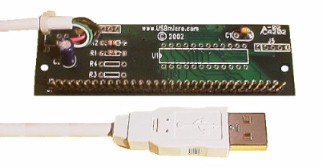
Developers who need a pre-built USB hardware may choose to use the
UsbMicro U4x1. This module provides 16 digital signal lines,
configurable
in any combination of inputs and outputs. Available devices
include the following:
- U401
- U421
- U451
Demo software is available which demonstrates input and output
operations specifically patterned for the U4x1 I/O. U4x1 hardware
is available at USBMicro (www.USBmicro.com). Kadtronix
also offers the USB
Digital I/O Commander software which is compatible with U4x1
devices.
Refer to the following resources for additional information:
http://www.kadtronix.com/digio.htm
http://www.usbmicro.com
http://www.circuitgizmos.com
The following tables present pin-out information: